


SIG12 Golf Simulator Enclosure
 Authorized Dealer - Full Warranty Included
Screen Material
Secure Checkout With


Talk to a Golf Simulator Expert
Standing by and ready to help.
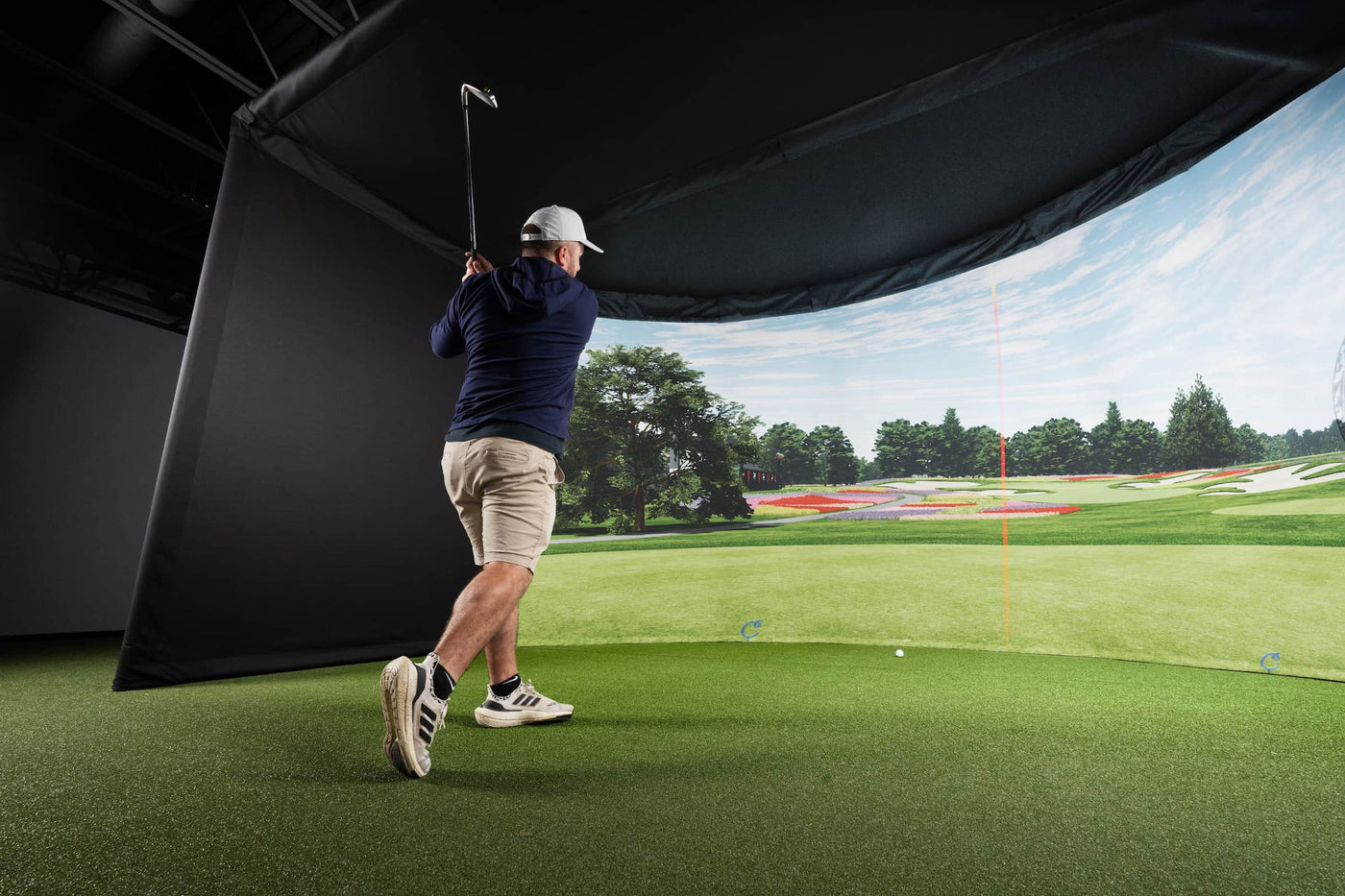
The SIG12 Golf Simulator Enclosure combines your selected impact screen with a push-pin frame, surround, protective foam padding, and ball bungees. It offers the largest screen and tallest frame of the SIG8, SIG10, and SIG12 enclosures, so you can choose a screen area that suits your indoor golf room.
Check the complete frame size: The enclosure measures 12 feet 2 inches wide, 9 feet 4 inches high, and 5 feet deep. The screen measures 11 feet 5 inches wide by 8 feet 7 inches high with a 4:3 aspect ratio. Allow additional room for your swing, hitting position, projector placement, and launch monitor requirements.
Choose one screen material: Select SIGPRO Premium (White) or SIGPRO Premier (Gray) from the available variants. This listing is for the enclosure and listed components; a projector, launch monitor, hitting mat, and simulator software are not included.
Also available in the SIG Signature Series are the smaller SIG8 and SIG 10 Enclosures.
What's Included:
- Choice of SIGPRO Premium (White) or Premier (Gray) Impact Screen
- Push Pin Poles and Connectors
- Protective Foam Padding
- Premium Enclosure Surround Material
- 6" Ball Bungees
What's Included
Dual Impact Screen Options
Select between the SIGPRO Premium (White) or SIGPRO Premier (Gray) Impact Screen based on your desired performance, durability, and budget.
The results demonstrated the superior durability of the SIGPRO screen compared to its competitors, along with reduced sound and bounce-back effects. Featuring double-stitched black vinyl edges and grommets, mounting the screen is effortless with the included ball bungees.

SIG Surround & Ball Bungees
Complete the look of your setup with the SIG Surround, designed to fit seamlessly around your enclosure for a polished appearance. Crafted from durable vinyl material, the SIG Surround enhances the aesthetics of your SIG12 Enclosure.
Included 6" Ball Bungees are utilized to securely attach the screen and nylon surround to the enclosure frame.

Push Pin Poles & Connectors
Frame assembly is simplified with color-coded push pin poles and connectors. These innovative kits streamline the setup process, making it smoother than ever to assemble your enclosure.

Specifications
SIG12 Enclosure Specifications
In general, the SIG12 Enclosure is designed to accommodate most spaces.
Please check your ceiling height and room width to ensure that you will be able to complete the assembly of your enclosure while allowing for 2"-3" of buffer space between the top of the SIG12 Enclosure (9'4") and your ceiling height.
Full Enclosure:
- Width: 12 feet 2 inches
- Height: 9 feet 4 inches
- Depth: 5 feet
Screen:
- Width: 11 feet 5 inch
- Height: 8 feet 7 inches
- Diagonal: 14 feet 3 inches
- Aspect Ratio: 4:3
Ensure that your club swing fits comfortably within your desired space, as higher ceilings may be necessary if your swing requires it. It's always advisable to place your setup in a space larger than the recommended requirements to ensure optimal usability.
Assembly
Assembly Instructions
Below, you'll find resources to guide you through the assembly process for your new frame and screen. Utilize the color-coded pipe kit and connectors to set up your frame first, then proceed to attach the black surround, impact screen, foam padding, and side barrier netting.
Resources
SIG12 Enclosure Assembly Instructions
FAQ
Q: What are the dimensions of the SIG12 Golf Simulator Enclosure?
A: The SIG12 Enclosure measures 12 feet 2 inches wide, 9 feet 4 inches high, and 5 feet deep. The screen itself measures 11 feet 5 inches wide by 8 feet 7 inches high, with a diagonal measurement of 14 feet 3 inches and a 4:3 aspect ratio.
Q: What is the recommended ceiling height for the SIG12?
A: We recommend at least 2 to 3 inches of buffer space between the top of the enclosure (9'4") and your ceiling. Depending on your swing, you may need a higher ceiling to comfortably accommodate your golf swing.
Q: How does the SIG12 enhance the projected image?
A: The SIG12 has a 4:3 screen. A compatible projector with the correct aspect-ratio settings and alignment can fill the screen; coverage depends on your projection setup.
Q: What screen options are available for the SIG12?
A: You can choose between the SIGPRO Premium (White) or SIGPRO Premier (Gray) Impact Screen depending on your performance needs and budget.
Q: How easy is the assembly process?
A: The SIG12 features color-coded push pin poles and connectors that make assembling the frame simple and intuitive. Step-by-step assembly instructions are also provided for added convenience.
Q: What materials are used for the enclosure surround?
A: The enclosure surround is made from high-quality, durable vinyl material, giving your setup a professional appearance while protecting the area around the screen.
Q: What accessories are included with the SIG12?
A: The SIG12 comes with protective foam padding, 6-inch ball bungees to secure the screen and surround, and a complete push pin pole and connector frame kit.
Q: Can I choose a smaller enclosure if the SIG12 is too large for my space?
A: Yes! The SIG8 and SIG10 Enclosures offer smaller size options with the same premium features found in the SIG12.
Product Reviews
No reviews to display.


About Indoor Golf Kit
At Indoor Golf Kit, we make it easier to build a golf setup that fits your space. Explore trusted brands, get practical advice, and enjoy personal support from your first questions to your next upgrade.
Shop With an Authorized Dealer
Choose genuine equipment from trusted brands, backed by manufacturer warranties. As an authorized dealer, Indoor Golf Kit offers knowledgeable guidance and personal support before and after your purchase, so you can buy with confidence.


