

Choose Golf Simulator Software for Your Hardware
Separate the software products and license terms
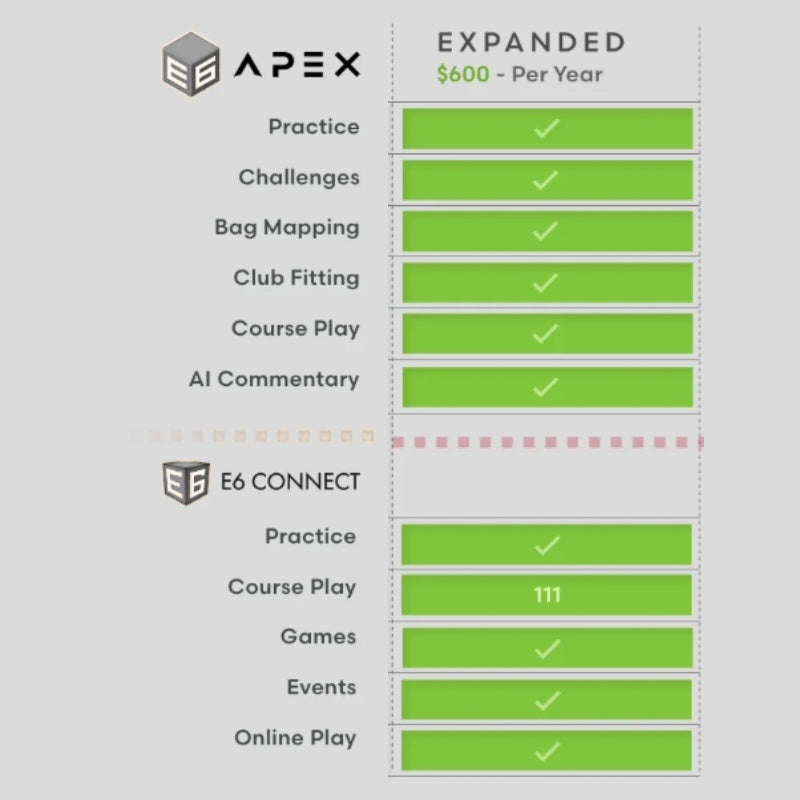
E6 CONNECT Home and the listed E6 APEX Expanded subscription are different products. Compare their supported hardware, platform and entitlement rather than choosing by the number of courses alone. Check whether a purchase is a subscription, a specific-duration license or another access format.
Confirm compatibility before buying
Use the software provider’s current compatibility and system requirements for your exact launch monitor and device. Plan the computer, graphics settings and internet requirements around that software. For business use, confirm the appropriate licensing instead of assuming a Home product covers a commercial installation.
Check the license in a fixed order
Identify the exact launch monitor and connection first, then the intended computer or tablet platform, then personal or business use, and finally the desired software edition and license duration. Only after those agree should you compare course access or extra practice tools. Keep a monitor’s connector entitlement separate from the course-software purchase when both are required.
Explore Related Golf Equipment
E6 CONNECT vs E6 APEX: Compare the License, Not Only the Courses. Read the comparison and planning details before choosing your configuration.
Frequently Asked Questions
Will E6 software work with every launch monitor?
No. Confirm support for the exact hardware model and the selected software product before purchasing.
Is E6 APEX Expanded the same purchase as E6 CONNECT Home?
No. They are separate listed products with their own access and compatibility terms.
Does buying a software license include a launch monitor?
A standalone software listing provides the specified software access. Hardware and other simulator components are separate unless expressly included.